Friday, 21 December 2012

Estadio Nacional Perú (From Google Earth to Unity)

Hi guys

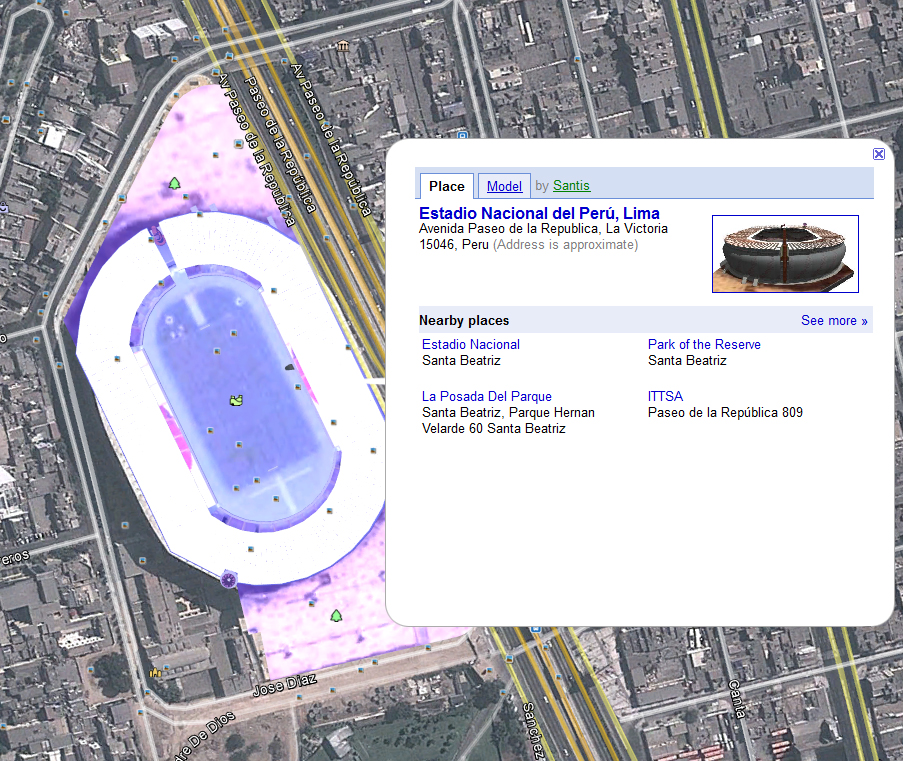
I often look Google Earth and I find very nice 3D buildings. In this issue I want to share with you the way that I convert a building from Google Earth to Unity, the example is using the "Estadio Nacional" from Lima-Perú.

1.- This is the new National Stadium from Lima-Perú, I found the 3D building in Google Earth:

2.- You can see the features of this building, in this case you can rotate the building, and the most important you can download the file (you can open the file with Google SketchUp):

3.- It's very important to recognize the work of others and be grateful. The building was uploaded by SANTI (Cesar Santoyo) from Colombia, you can see his profile, he's got more good buildings too:

4.-  In the Street View mode you can "travel" the building, and this looks very nice, just imagine all the interactions that you can get whit this model:


5.- This is the *.skp file downloaded, looks great from Google SketchUp:

6.-But it's got many polygons, and we must optimize, in this case I used 3ds Max:


7.- And this is the final outcome:


 8.- You can play here (Arrows Keys or ASWD and Space Bar to Jump): PLAY ME!

Monday, 17 December 2012

LaloCat: from dreams to Unity (Issue -02_B)

The Track that Lady Gaga Loves :)

1.- Some WIP, check out the model, it hasn't got the cabin,
I had an error with the mesh, and I had to redo it again in order to import it to Unity:


2.- Finally at Unity 3D. And no pilot was injured in these tests, in fact we do not use pilots:
 

3.- Physics in Unity are very good:


4.- Water Mode!!! Check out the outcomes:


5.- Air Mode!!!


6.- Dead Mode :( LOL


7.- And YES, you can play here (Arrows Keys to move and F5 to refresh): PLAY ME!

LaloCat: from dreams to Unity (Issue -02_A)

It was a personal project in order to learn How to make best textures for your assets. To the end I did not stop to take this to unity. Thi is a typical Workflow:

1.- You should investigate about pics or videos:


 2.- Make a bluesprints in order to get a best spatial idea in your 3D Software, It would be very useful for make good textures. Check out the "collider" modelled together the little truck:


3.- There is a technique called "Baked Textures", it's a good tool to get a better textures for videogames:


4.-You need to "unwrap" your 3D models and export the images to an image editor like Gimp or Photoshop and tweak every detail:


5.- After a lot of test-error this is the result (3DS Max and Vray):


 6.- And now you must export your model in one standar format to Unity, in my case I used .FBX. You should do continuous exports while you are doing your model and don't wait for errors in your finished 3D model:


 7.- Ok, I'd got the car...but I need a Track....check out the next part for it :)

Classic Car Game (Issue - 01)

A long time since our last post.

I was cleaning my computer and I found some "test" that I want to share with everyone, this is a the firts Issue:

The Classical Car Game from Unity 2.6 (Yes, right now Unity 4 is a reality)

1.- If you are new to Unity, just imagine this: With Unity 2.6 ( around 3 years ago) you've got a complete tutorial and FILEs in order to built your car game, it's a terrific idea!!!


2.- Everyone played with this and their owns custom version, obvious me too, in this case I just added a new car. Check out the water!


3.- Canada's Flag? Actually not, this a Peruvian Flag. You can see the complete custom car in the next post, I found it while I was cleaning my server :'(


 4.- Stop and stare about the other players! Yes, you can see mods about this tutorials but without other players.

5.- But the Assets and Scripts were so good that you can add your favourites songs and play along for a while...Look that physics LOL


6.- And here the link to play: PLAY ME!

Wednesday, 1 February 2012

Unity 3.5 Public Beta


Flash Target!!!

Yes, everyone know it. Basically it's the main reason for this new Unity, the Flash Deployment Add-on.


But I want to know more about another news or enhanced features. I still did not try this new version, but I'll do a review of what I hope to come according to advertising...Yes, a Blind Date.

Ok, Let's dot it:

1.- Shuriken Particle System
This sounds to me like "ryu shoryuken". Well, basically it's a Curve Editor in order to get a better tweak (and more intuitive) for your particles effects. I guess it's like the Material Editor by Nodes in 3dsMax 2012.


2.- Built-in Pathfinding

OHH!!! Maybe the best news today. AI is a must and hard work to complete, you can fin a lot of help in sites like: A*Pathfinding Project or look this video:


3.- Occlusion Culling & LOD
I have not yet used this feature, but I understand that improves the execution of huge maps in these missions that we like to get to play and beat all the invaders.
Level Of Detail is a feature thay really improve the playable feature of your games.

4.- Google Chrome Native Client deployment
That's great 'cos a lot of people when see the Install Windows just close the window XD.


5.- Linear Space Lighting and HDR
HDR Render for images at Unity....mmmm, sounds good but I wonder if iOS Devices or Android can support it.

6.- And so much more...
Yes, they say so lol, Unity is a fast and very useful tool to create 3d multimedia applications, yes, even 3D games for your iPhone lol.

I wonder if this new release amazed me a lot. I remember the days when making a game in Flash that simulates 3D was really difficult and impractical.
In fact, look for a green old 3D plane out there I have a game that never ends in Flash.


Oh, the Prices:
Unity Pro 1500 usd + iOS Pro 1500 usd + Android Pro 1500 usd = 4500uss. That's your target like a Professional Freelance or an ProStudio... and obvious FREE for the Indie Version.


Monday, 28 March 2011

Reinvaders Update - Gameplay

Hi!!!

After two weeks of heavy development (I've even worked on Saturdays on this), I can finally show an advanced.

I created 3 new characters: a "chanchito"(a pig), an Ufo and a satellite, I've also added some variations in the formation of the enemy and stuff.

Hope you enjoy it, I need time to finish the final story, create more characters, bosses and environments. How quick were the two-week vacation... lol

I had problems with some rotations and artificial intelligence from the satellites so that each shoot at random and not all at once, also with the movement as a sine function, but it was fun.

Here some pics from my WIP:

1.- The "Chanchito":
2.- A test with the kidnapped pig:
3.- A quick shot from the web-player:
4.- The satellite from 3dsMax:
5.- A pic with the characters lol:
And the link to play this test with just only 5 levels (for now):
Play the game!


Saturday, 5 March 2011

RE-Invaders Update!!!

I'm going to make an update about my RE-Invaders - aka "Another_Invaders_Remake"

For now a render image with the new character-aka"blank_space_for_name_XD".
He's staring the new rocket of our hero!!!


And one more shot inside the Unity3d 2.6:


It would be hurt (Animated Texture):


They want to pose a last time (3dsMax 2009 - Vray 1.5):


....And the Poster before the battle:


Keep on seeing my blog in order to see more WIP.

Tuesday, 13 July 2010

RE-Invaders

A long time ago I had a really boring weekend, so I asked to myself: Hey, you know Java...Why don't you search how to make games in java?

So after 2 days I was making my first "import": A really big mesh (Just a plane with a lot of tris) It was my first import from 3dsMax to JMonkey Engine...and it was WOW!!! (just for me)


Suddenly I've got it: Make games is easy!!! (Hey you, don't laugh so much)


I can't remember "How", but one PuppysGames' demo came to my hands: Tittan Attacks!, so I played it and Oh man, What a surprise!!! It's a space invaders remake, it's simple but not simpler, I don't know if this game was made in Java or not, whatever, the general concept art is retro with a great sfx and music track, and the main thing: It's a real addictive game!!!


So I decided to make a game like this, but with my own experiences, even I tried to create a new character, you know, a Texas rich kid trying to "invades" Huacho


But, time again invaded to me my work and pay my bills, I wish to meet this rich guy and ask for money and run away lol, whatever, after a few weeks I met Unity and I said to myself: Now or forget that! so I forgot it again , no, I just kidding.

Well, I decided to share with you what I did:


You can play here!!! XD: (REI)nvaders

Thank you for watching
Cya later.

Sunday, 11 July 2010

Unity to the Car!!! lol

The last weekend I was working with the new unity 3d's Car tutorial: Car Tutorial

It was amazing, you know the graphics are so fantastic and the scripts are really powerful.

So I decided to dive more depply in the code, and after a few days I thought I had learned enough... WTH!!! I was wrong :(


But It was a great thing because I decided to make my own car game from the ground (at least in my mind), so I turned on 3ds Max:


Please don't forget a few very important things:

1.- Model your objects with this in your mind: "real scale". Search the average size for your car, e.g. 5 meters to length, etc... The same for the track and so.
2.- Press "number 7" key in your viewport in order to see the count of polys you make. If you open the fbx files inside de car tutorial from unity you'll see that car is around 5320 polys.


3.- Personally, the best technique to make low polys model is: Box Modelling, you can find a lot of tutorials in the web, some links:
Cat Box Modelling (Yeah, CaT not CaR)
After all you work done, you need to transport your objects to a Game Engine (that's the complicate name for Unity, UDK, Ogre3d, Jmonkey, Xna, etc...), so one good protocol is FBX, but that's no perfect at all, be carefull around "isolated" vertices in you mesh in order don't crash 3ds max when you export your object.
4.- If you are not a graphic artist like me, you should try to find good webs around concept art for your objects, for example: While I was making box modelling I was searching in the web and I found this really great web, take your time to view this and write a comment to the author: SmileyBones


5.- Finally you don't forget the Axes, the devil Axes lol, I'm kidding, That's really easy. In 3ds max world the axes upward is Z Axe, in Unity and the most game engines is Y Axe the one upward.
So Before export your object, change the Axes: Select your object, change the Reference Coordinate System to Local and go to Hierarchy Panel>Pivot>Affect Pivot Only, press "E" key to rotate the gizmo and rotate the Y axes to upward (press "A" key to fixing rotate, the Z Axes point to you and X axes point the horizon (X, Y are the same like our normal coordinate system, remember the school, just the z "imaginary goes out the screen point to you"), and that's all.


And yes, after a lot of hours thinking about this, I finally exported my car and my track (I'm not an artist)


But this was just the real begining, now the CODE!!! In my first try nothing worked lol so I turned off the lights and I went for a beer and take a rest.


NEXT DAY (I think so, whatever)
I have been following every step in the same way like the tuto, so WHY Things DOESN'T WORK???
Easy: I haven't been every step, I left the music script to the end ( I though the sounds to the final part, first this "stooopish" car must turn on ), don't make my mistake, at least follow the same sequence in the tutorial, when the things are ok for you, it's time to make a BaseLine (save your file and go for another beer) and start with the cicle method "try - error - think - dammit!"

With a little of good luck you should see your pretty models becomes to life, and your finger moves them (WASD and Space Bar) lol


Well, after a few minutes my game is a really boring game, I'm the lonely one in this party :( and there is not much to say, you need human players or at least a decent AI script in order to get a little fun, at least you must try it.


That's a hard way, but if you want try it, you are not alone. The same for the artist is the same for coders, someone more was here, I found this Car's AI for Unity:
1.- A basic but really useful Waypoint system: Gotow's car tutorial


2.- A more general AI system called UnitySteer: UnitySteer
They are changing everything to have everything ready for Unity 3.0, so you must see this topic in the unity's forum: UnitySteer Post at Unity's Forum


Well, it's time to awake and come back to reality, the weekend has gone, I'll hope to see your comments in my next dream lol.


Link: Play Me!